Day 15 of 20 · Week 3: Design patterns
Partners and MSPs
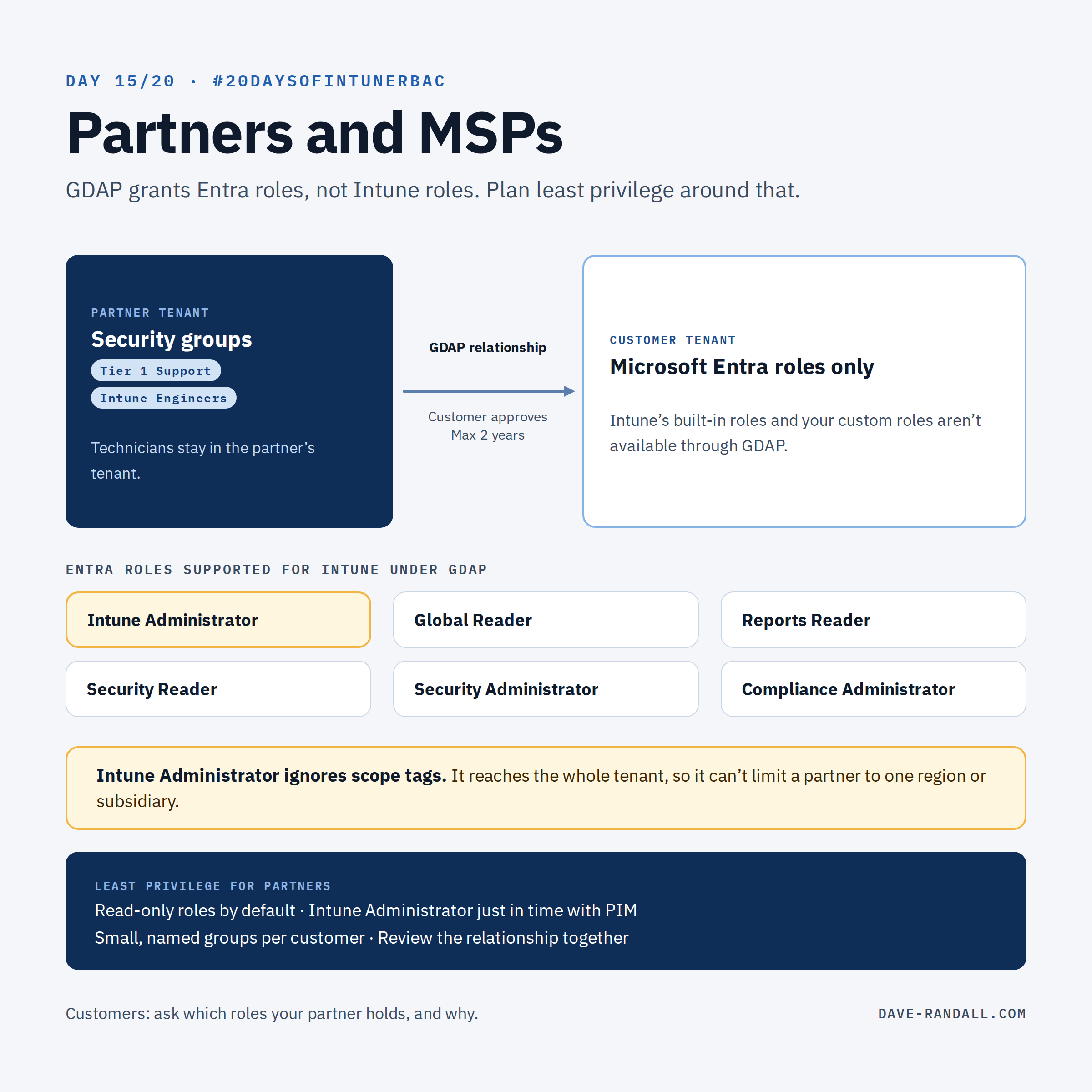
Partners reach customer tenants through GDAP, which grants Entra roles, not Intune roles. That changes how least privilege works for MSPs, and what customers should ask for.
Most of this series assumed your admins live in your tenant. For many organizations, some don’t: a partner or managed service provider (MSP) runs part or all of Intune for them. Today is for both sides of that relationship.
How partners get in: GDAP
Partners access customer tenants through granular delegated admin privileges (GDAP) in Partner Center. Microsoft describes it as least-privileged, time-bound access that “customers must explicitly grant.”
What matters for Intune RBAC:
- GDAP grants Microsoft Entra roles, assigned to security groups in the partner’s tenant.
- No permanent relationships. “The maximum duration of a GDAP relationship is two years.” Auto-extend adds six months at a time, but not for relationships that include Global Administrator.
- Per-customer partitioning. Partners map their own security groups (for example, Tier 1 Support) to roles, customer by customer.
The Intune catch
Microsoft lists the Entra roles supported for Intune under GDAP:
| Role | What it means in Intune |
|---|---|
| Intune Administrator | Full access to Intune. Ignores scope tags (Day 7). |
| Global Reader | Read-only across the tenant |
| Reports Reader | Reporting |
| Security Reader / Security Administrator | Security features |
| Compliance Administrator | Compliance features |
Notice what’s not there: Intune’s own RBAC roles. Help Desk Operator, Application Manager, your custom roles from Day 11 aren’t on the list. So for hands-on Intune work through GDAP, the role a partner technician gets is usually Intune Administrator, the broad role this series has been steering everyone away from. Microsoft’s own GDAP guidance lists Intune Administrator for a tier 1 technician’s “device enrollment and troubleshooting.”
GDAP support also doesn’t cover enrolling Microsoft Tunnel servers or installing Intune connectors (such as the Intune Connector for Active Directory), so plan those tasks with the customer.
It varies, so talk about it
To be honest, MSP-based RBAC configurations can and do vary from MSP to MSP. Some customers are OK with the GDAP roles. Other customers need much finer-grained permissions before they’ll have an MSP manage their tenant.
MSPs: take time to discuss the permissions model you use with your customers. Customers: be sure you feel 100% comfortable with the permissions granted to your MSP. It’s still your data, after all.
For partners: least privilege anyway
- Read-only by default. Map most technicians to Global Reader or Reports Reader. Many tickets only need to look.
- Intune Administrator just in time. Microsoft supports Privileged Identity Management (PIM) on GDAP security groups in the partner tenant, so technicians elevate when needed and lose access automatically. (Week 4 covers PIM.)
- Small, named groups. Keep the Intune Administrator group small, and separate it per customer where you can.
- Use the tooling. Microsoft 365 Lighthouse has a GDAP setup wizard with role recommendations by job and reusable templates.
For customers: what to ask your partner
- Which roles does our GDAP relationship include, and why each one?
- Is Intune Administrator standing or just-in-time?
- When does the relationship expire, and is auto-extend on?
- If the partner should only manage part of your tenant, such as one region or subsidiary, how will that be enforced? Intune Administrator can’t be limited with scope tags, so that conversation has to happen up front.
- How often will you review it together? Put it on the calendar.
Try it
Customers: in the Microsoft 365 admin center, open your partner relationships and list the roles each partner holds. Partners: pick one customer and count how many technicians hold Intune Administrator full-time.
That wraps Week 3: Design patterns. Next week is governance: just-in-time access, Multi Admin Approval, auditing, and the reference architecture that ties all 20 days together.
Further reading
- Introduction to granular delegated admin privileges (GDAP), Microsoft Learn
- Workloads supported by GDAP, Microsoft Learn
- GDAP role guidance, Microsoft Learn
- GDAP frequently asked questions, Microsoft Learn
- Set up GDAP in Microsoft 365 Lighthouse, Microsoft Learn